


Guide: step-by-step instruction on Jose Art
 Art DomJune 2, 2026
Jose Art Gallery (JAG) is an international online gallery and the largest social network for artists, collectors, gallery owners, and curators. Unlike most art marketplaces, it combines the functions of a shop and a professional social network: an artist can not only sell artworks, but also publish posts, articles, exhibition announcements, and communicate directly with collectors. Registration is free, and the platform commission is 40% of the sale amount.
What Jose Art Gallery is and why it is suitable for Ukrainian artists
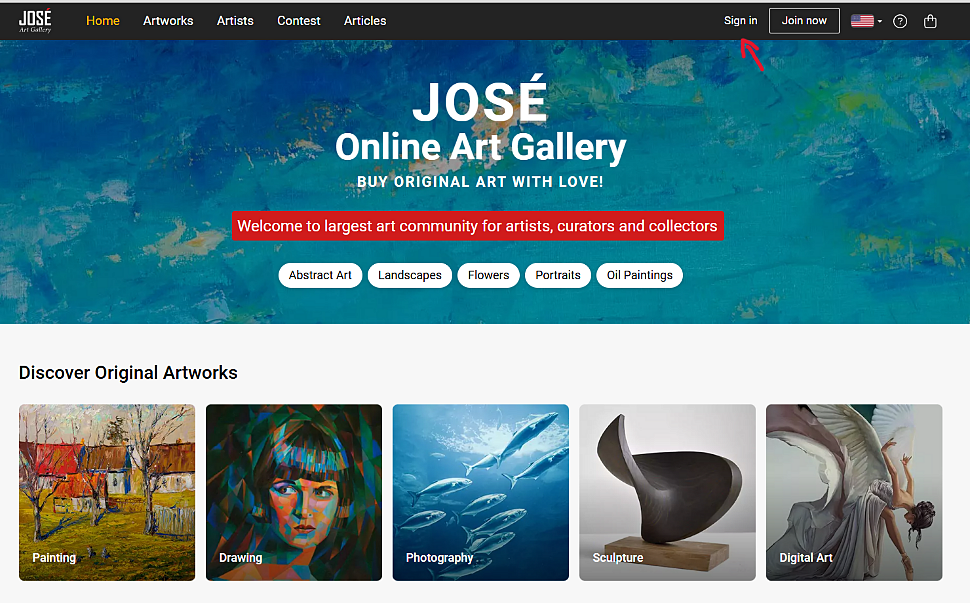
Jose Art Gallery is a service with a strong social component. Here, an artist can do more than simply upload artworks — they can manage a full profile: publish articles about art, announce exhibitions, participate in platform contests (the Contest section), and build an audience of collector-followers. This is exactly what makes JAG similar to Instagram for professional artists — but with a built-in shop.
Key facts about the platform:
- Free registration — no entry fee and no curatorial selection.
- 40% commission on the sale amount — higher than ArtMajeur (10-35%), but lower than Saatchi Art (~40%) and Singulart (50%).
- Sale of originals, reproductions, and digital files — three formats in one place.
- Sale of souvenir products — the platform supports handmade goods.
- Participation in contests — monthly art contests with prizes, helping new artists gain visibility without an advertising budget.
- Direct communication with buyers — a built-in messenger for negotiations.
- Verification is required — to start selling, an artist must complete 5 profile activation steps.
Step 1: Creating an account on joseartgallery.com
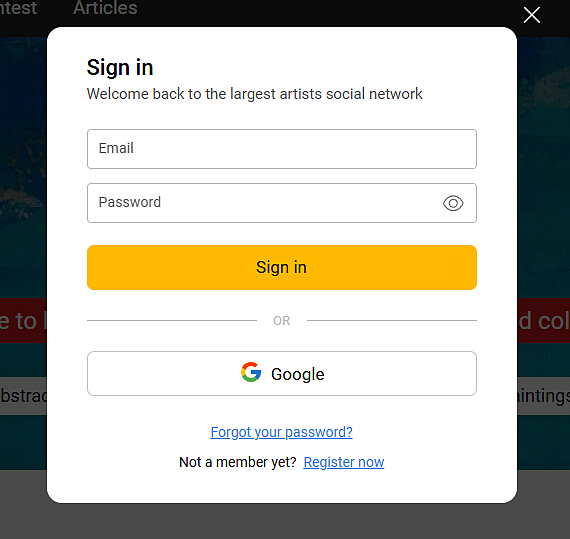
1.1) Go to joseartgallery.com and click the "Join now" button in the upper-right corner of the homepage.
1.2) Two registration methods are available:
- authorization via a Google account (the fastest option);
- manual entry of email and password (the “Register now” button).
1.3) Enter your email and create a secure password. If you register via Google, the data is filled in automatically.
Step 2: Choosing the profile type
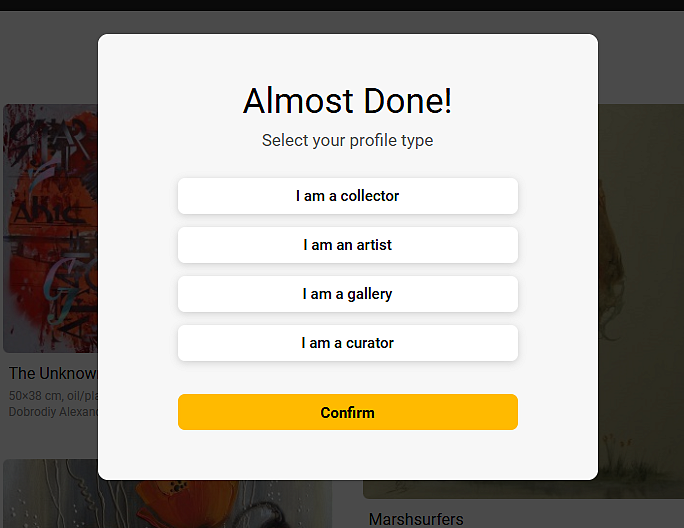
Immediately after creating an account, the platform will open the "Almost Done! Select your profile type" window with four options:
- I am a collector — for buyers and art lovers.
- I am an artist — if you create and sell your own works. Choose this option.
- I am a gallery — if you represent a gallery or several artists.
- I am a curator — for curators and art agents.
Select "I am an artist" and click "Confirm". The profile type affects the available features — artists get access to the artwork upload section and sales tools.
Step 3: Filling in the artist profile
After choosing the profile type, you will be taken to the artist page. At the top, there is a pink "Profile is not active!" banner with a 5-step roadmap that must be completed to activate sales:
- Publish your first artwork — publish your first artwork.
- Fill out your author profile — complete the artist profile.
- Confirm your phone number and email — verify your contact details.
- Specify your tax address — provide your tax address.
- Proceed with verification — complete identity verification.
Start by filling in your profile — click "Edit Profile" in the upper-right corner of the page.
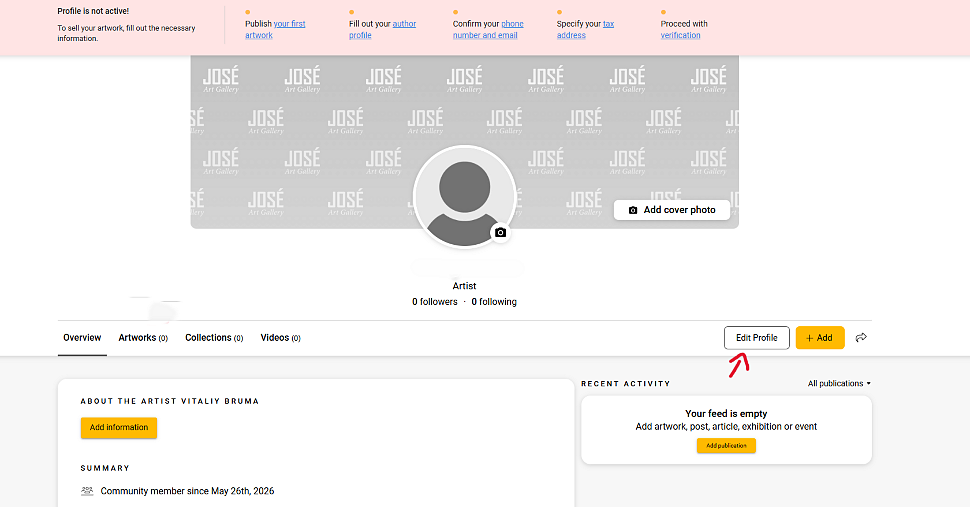
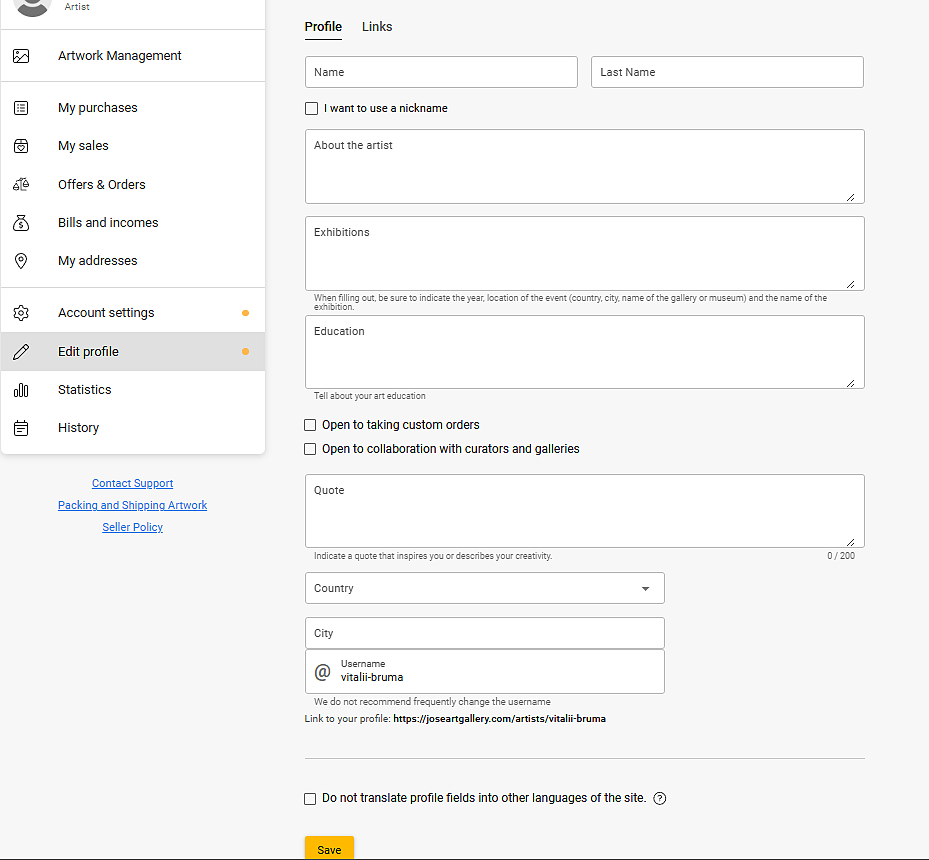
Fill in the following sections:
3.1) About. A brief description of your art, style, and technique. Write in English — the platform works with an international audience. Recommended length: 150-300 words.
3.2) Quote. Your artistic quote or motto. This is the first thing a profile visitor sees — make it memorable.
3.3) Photos. Upload 4-8 photos: you in the studio, your artworks in interiors, and the creation process. The platform provides 8 photo slots — fill in at least 4.
3.4) Exhibitions. List the exhibitions you have participated in: name, location (gallery/museum), and year.
3.5) Education. Art education: university, specialization, graduation year. If you are self-taught, mention significant masterclasses or mentors.
3.6) Profile photo and cover. Upload a clear face photo (minimum 400×400 px) and a profile cover (recommended 1200×300 px or a wide-format reproduction of your artwork).
Step 4: Verifying contacts and tax address
To activate sales, JAG requires confirmation of contact details and tax address. This is a standard procedure for all international platforms.
4.1) Confirm your phone number and email. An email with an activation link will be sent to your email address. An SMS with a confirmation code will be sent to your phone. Enter both codes in the corresponding fields in your account.
4.2) Specify your tax address. Enter your actual residential address: country, city, postal code. The platform may request tax data (tax ID or equivalent), depending on your country. For Ukrainian artists, a physical address is sufficient.
4.3) Proceed with verification. The final identity verification step requires a scan or photo of a document (passport). This protects the platform from fake accounts.
After completing all 5 steps, the profile receives the “Active” status — and you can start accepting orders.
Now you are ready to publish your first artwork. Read our next article “Guide: How to Sell Art Objects on Jose Art Gallery” to learn how to photograph a painting correctly, fill in the description, and list the work for sale.
Read also — TOP 6 online galleries for selling paintings and sculptures, where collectors from all over the world often buy art objects
More interesting and useful news on our social media:
You may also be interested in the following services of our gallery
Exporting paintings abroad (obtaining a permit)
Attribution and expertise (authorship verification)
Packing paintings in cardboard boxes
Buying paintings by Ukrainian artists
Listing a painting for sale on Jose Art Gallery is not difficult, but the platform requires several mandatory fields to be completed before the work becomes visible to buyers. JAG’s main advantage over other platforms is automatic artwork visualization in interiors directly in the upload form. The buyer immediately sees how the painting will look in a bedroom, living room, or office — this significantly increases conversion.
Earlier, we published an article where we described in detail the registration process on the Jose Art Gallery platform. In this article, we will describe step by step how to add and publish your first artwork. We also recommend reading our guide to selling on Saatchi Art — it contains many practical tips on photographing artworks.
Jose Art Gallery features: how it differs from other platforms
- Social component. JAG is both a shop and a social network. You can manage a page like Instagram: publish posts, articles, announce exhibitions, and participate in contests. This attracts collector-followers without an advertising budget.
- 40% commission — a standard level for curated platforms.
- Interior visualization is built directly into the upload form: the platform automatically places the artwork image onto interior photos of different styles. This is a convincing argument for a hesitant buyer.
- Price excluding shipping — you specify the price of the artwork, and shipping is calculated separately.
- Three sale formats — original, reproduction, and digital file.
- JAG Contest competitions — monthly voting contests. Winners receive additional visibility on the homepage.
Step 1: How to add your first artwork
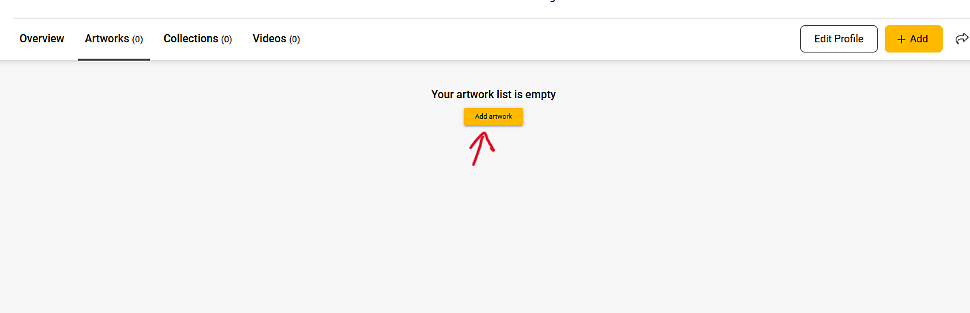
There are two ways to add an artwork:
Method 1: on your artist page, go to the "Artworks" tab — you will see the "Add artwork" button (if the list is empty) or "+ Add" in the upper-right corner.
Method 2: click the "+ Add" button in the upper-right corner of the profile. The “Create” menu will open with five options:
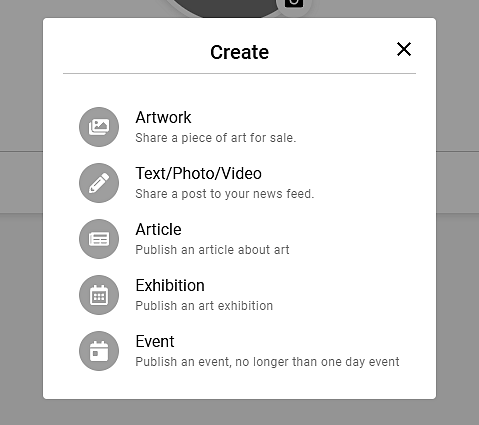
- Artwork — add an artwork for sale. Choose this option.
- Text/Photo/Video — publish a post in the feed (like on Instagram).
- Article — write an article about art.
- Exhibition — announce an exhibition.
- Event — announce an event.
Select "Artwork". The artwork upload form will open with three main sections: Images and Video, Artwork Characteristics, Sales and Delivery Information.
Step 2: Uploading photos
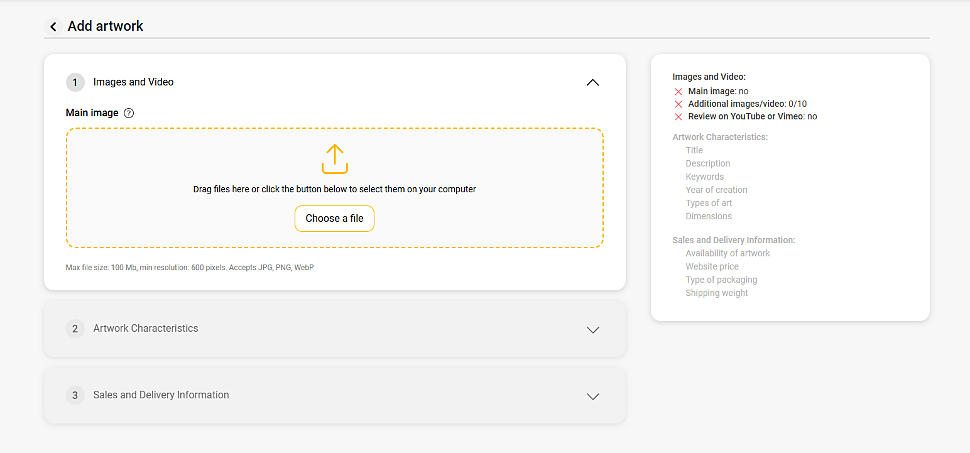
The 1. Images and Video section contains:
- Main image — required. Drag and drop the file or click “Choose a file”. Allowed formats: JPG, PNG, WebP. Maximum size: 100 MB. Minimum resolution: 600 px. We recommend at least 2000 px on the long side.
- Additional images/video — up to 10 additional photos or videos. Use the slots for details (signature, brushstroke texture), the back side, and the artwork held by the artist.
- Review on YouTube or Vimeo — a link to a video about the artwork or creation process. Optional, but it increases buyer trust.
Recommended photo order: 1) full view on a white background; 2-4) details; 5) back side with stretcher frame; 6) artwork in an interior or in the artist’s hands.
Step 3: Filling in artwork characteristics
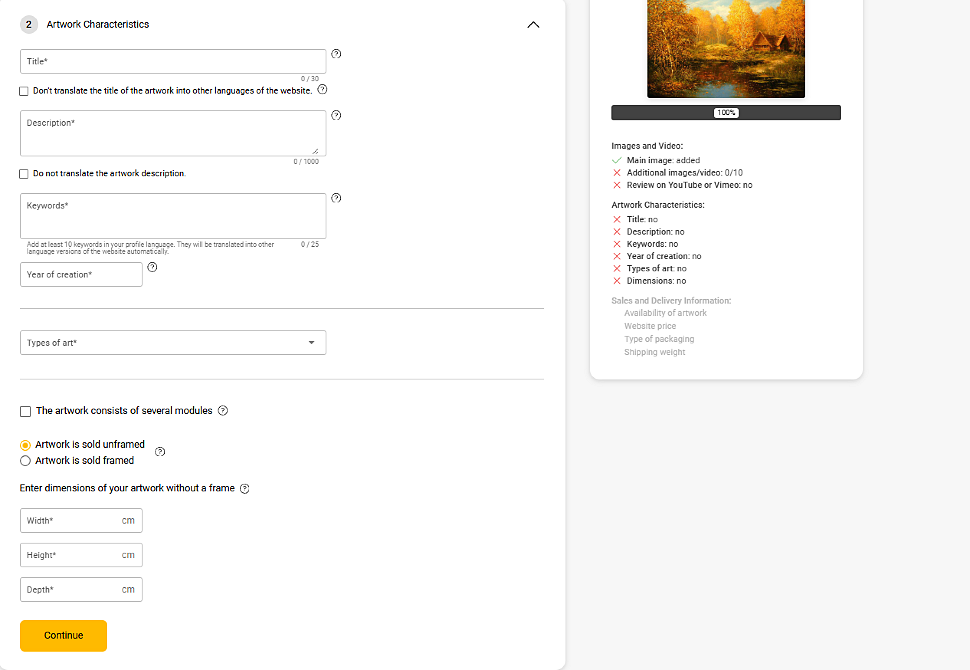
The 2. Artwork Characteristics section contains mandatory fields. On the left is the form, and on the right is a checklist showing what has already been completed (✓) and what is still required (✗).
3.1) Title — up to 30 characters. The title should be specific: “Sunset in the Carpathians” is better than “Landscape No. 3”. The platform automatically translates the title into other site languages — but you can tick “Don't translate the title” if you want to keep the original title.
3.2) Description — up to 1000 characters. Describe the concept, creation story, and technical features. The “Do not translate the artwork description” checkbox is useful if the description contains specific Ukrainian terms that should not be translated automatically.
3.3) Keywords — at least 10 keywords. It is recommended to add 20-25. Example: landscape, oil painting, Ukraine, autumn, forest, contemporary art, impressionism, original painting, canvas, nature. The more accurate the keywords are, the better the artwork is indexed in search.
3.4) Year of creation — the exact year the artwork was created.
3.5) Types of art — select from the dropdown list: Painting, Drawing, Photography, Sculpture, Digital Art, and others.
3.6) Dimensions — width, height, and depth in centimeters. Depth means the thickness of the stretcher frame or sculpture. Choose: “Artwork is sold unframed” or “Artwork is sold framed”. If the artwork consists of several parts, tick “The artwork consists of several modules”.
Step 4: Pricing and delivery
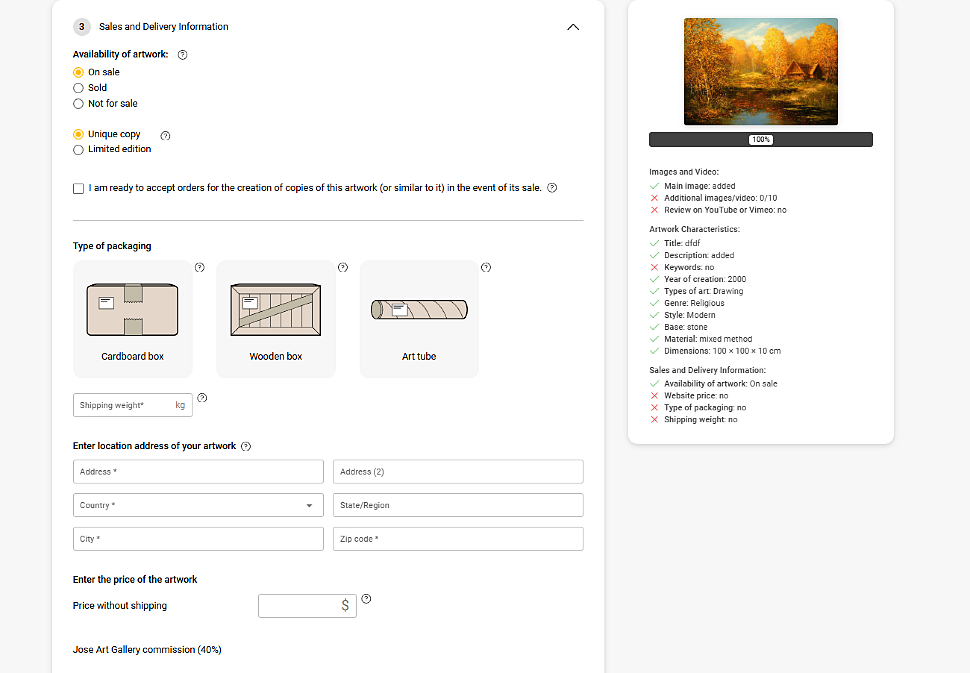
The 3. Sales and Delivery Information section is the most important for sales.
5.1) Availability of artwork:
- On sale — the artwork is available for purchase. Choose this option.
- Sold — the artwork has been sold (for the archive of sold works).
- Not for sale — the artwork is in the portfolio and is not for sale.
5.2) Unique copy / Limited edition — original (one-of-a-kind) or limited edition.
5.3) Readiness to accept orders for a copy. Tick “I am ready to accept orders for the creation of copies of this artwork” if you are ready to create a similar artwork on request.
5.4) Type of packaging:
- Cardboard box — cardboard box (standard for most artworks).
- Wooden box — wooden crate (for expensive or large works).
- Art tube — tube (for works without a stretcher frame, rolled up).
5.5) Shipping weight — specify the packaged weight in kilograms. The platform uses this to calculate shipping costs for the buyer.
5.6) Enter location address of your artwork — where the artwork will be shipped from. Enter a real address in Ukraine.
5.7) Price without shipping — the amount in dollars ($). Please note: the field immediately shows “Jose Art Gallery commission (40%)”. Calculate the price with this in mind:
If you want to receive $300 net → set the price at $500 (300 / 0.60 = 500).
The shipping cost for the buyer is calculated separately. For Ukrainian artists, Ukrposhta EMS, Meest Express, or DHL are suitable. For any international shipment of an original painting from Ukraine, an export permit from the Ministry of Culture is required.
Step 5: Visualizing artwork in interiors
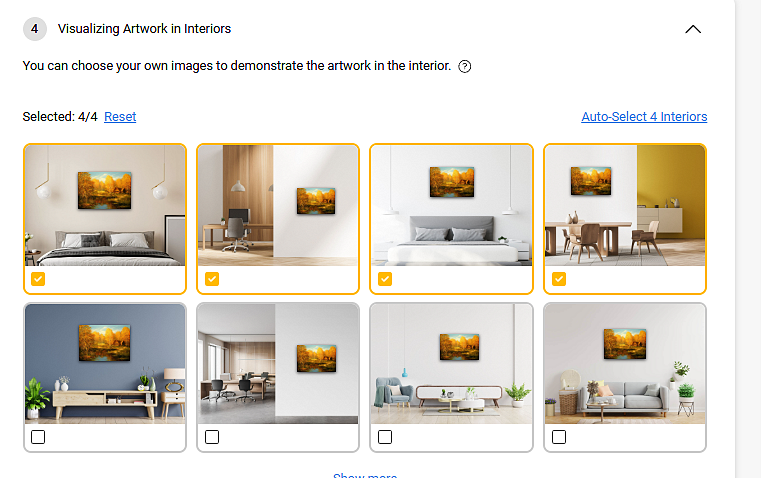
This is a unique feature of Jose Art Gallery that Saatchi Art or ArtMajeur do not have. The 4. Visualizing Artwork in Interiors section automatically places the image of your artwork onto interior photos in different styles — bedroom, living room, office, dining room.
Click "Auto-Select 4 Interiors" — the platform will automatically select the 4 most suitable options. Or choose manually from the available interior gallery. You can select up to 4 options at the same time.
This feature is critically important for sales: the collector sees not just a painting on a white background, but how it fits into a real interior. According to the platform itself, works with interior visualization sell significantly better than those without it. Do not skip this step.
Step 6: Publishing the artwork
After completing all sections, click the "Continue" button (in the Artwork Characteristics section) and then "Publish". Jose Art Gallery has no curatorial review — the artwork is published immediately after all mandatory fields are completed.
Before publishing, check the checklist on the right (green checkmarks ✓ should appear next to all key items):
- Main image: added ✓
- Title: filled ✓
- Description: added ✓
- Keywords: added (minimum 10) ✓
- Year of creation: filled ✓
- Types of art: selected ✓
- Dimensions: filled ✓
- Availability of artwork: On sale ✓
- Type of packaging: selected ✓
- Shipping weight: filled ✓
Do not forget to participate in JAG Contest as well — it is a free way to gain additional visibility on the platform. Winners’ and finalists’ works are featured on the homepage and in the gallery’s newsletters.
When shipping a sold artwork, do not forget to prepare the necessary documents: an export permit (550 UAH, 1-2 days at ArtDom), an invoice (free in our invoice generator), and proper painting packaging.